 by Schlosser Studio
Room Ledger The workbook
Room Ledger
One standard .xlsx spreadsheet and printable pages. List every piece in every room, price it, see what the client pays and when it has to be ordered, and print the client a page with no costs on it.
- Can I rename the rooms and statuses?
- Rooms, yes: they are cells you type over. The five statuses are fixed: proposed, approved, ordered, shipped and delivered.
- How many items does it hold?
- 300 item lines, 20 rooms and 40 vendors.
- Do I need special software?
- No. It is a standard .xlsx spreadsheet with plain formulas and no macros, and it opens in your spreadsheet app. You can edit every shaded cell.
- What if it is not useful to me?
- The refund line is in the buy box on this page: 14 days, in full, by email.
The tabs, as they look
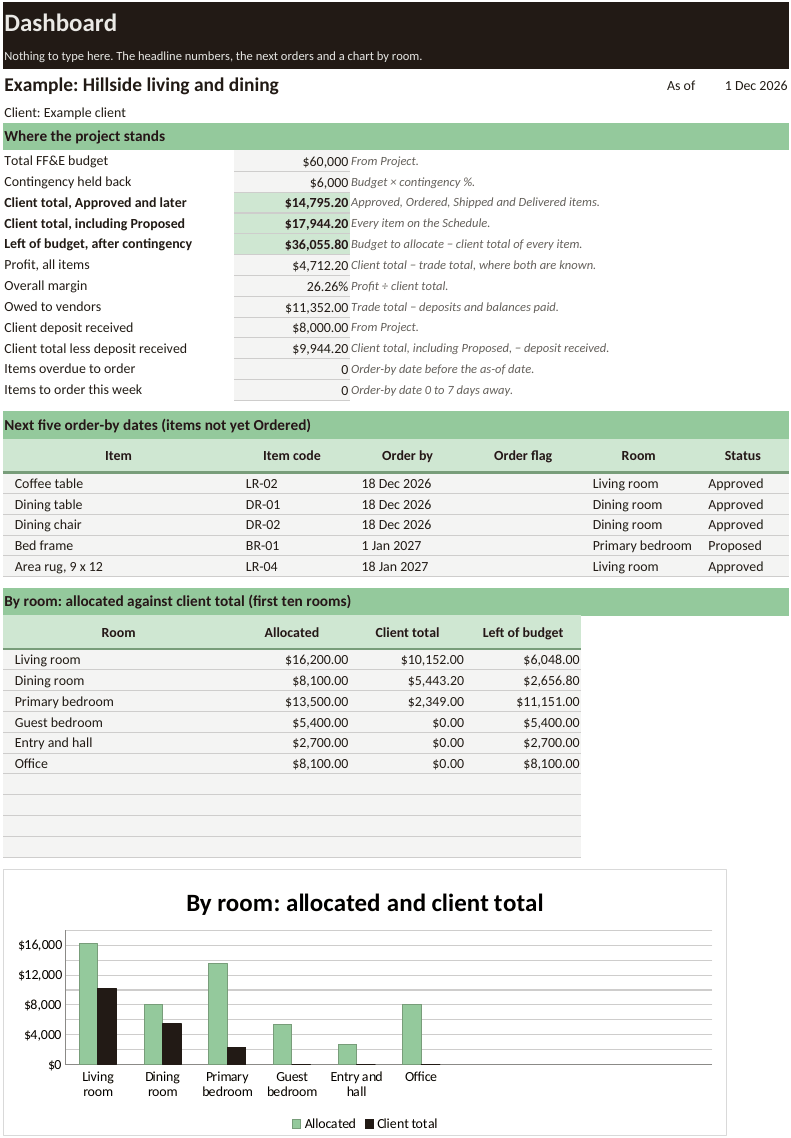
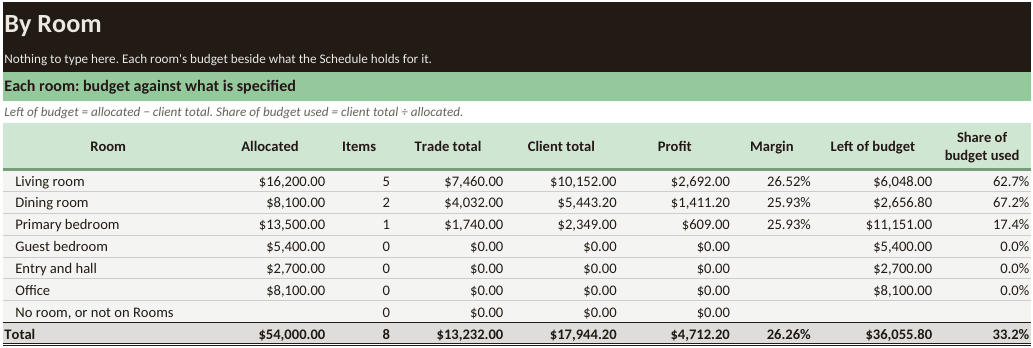
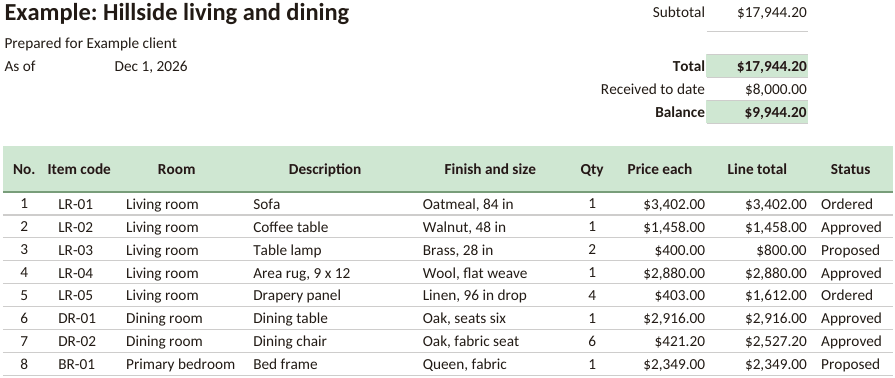
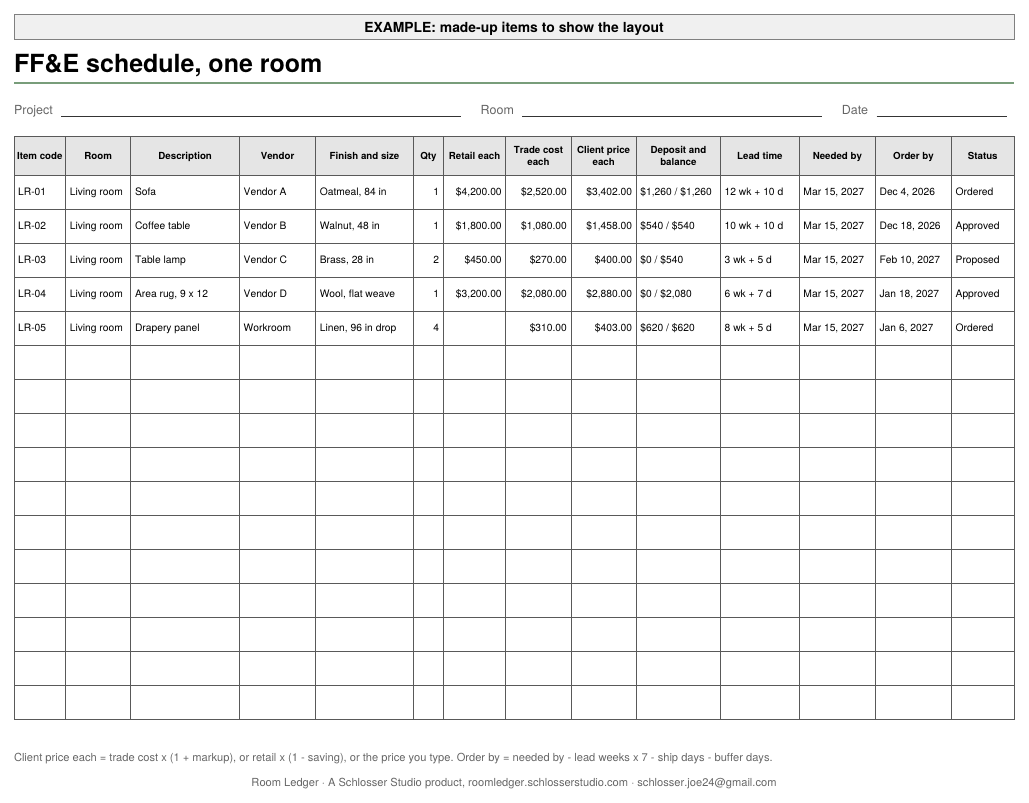
Pictures of the real file with the example numbers in, and of a printable page.
On a phone the tab pictures scroll sideways inside their own box. Tap one to open it full size.

What's inside
Ten tabs and printable pages.
- Start HereWhat each tab does, how to clear the examples, and the color legend: shaded cells are yours to fill, plain ones calculate.
- ProjectProject and client names, the install date, receiving days, a default markup, the total budget, the contingency, the client's deposit and an as-of date.
- RoomsUp to 20 rooms, each with a share of the budget or a dollar amount, and what is left to allocate as you go.
- VendorsUp to 40 vendors with a default deposit and shipping days, so each item fills itself in.
- ScheduleThe main tab: up to 300 items, one per row. Type any one of markup, client saving or client price; the margin, trade discount, deposits, order-by date and a flag are calculated.
- By RoomEach room's allocation against its client total, profit, margin and what is left.
- By VendorItems, trade total, deposits due and paid, and what you still owe each vendor.
- By StatusProposed, approved, ordered, shipped and delivered: the items and totals in each, with overdue and order-this-week counts.
- DashboardBudget against client total, profit, what you owe vendors, the next five order-by dates and a chart by room, on one page.
- Client SummaryThe page for the client: rooms, items, quantities and client prices only, no costs, in the schedule's order. Prints on US Letter and A4.
Who it is for
- Solo and small-studio designers and decorators tracking their own projects, room by room
- Anyone who wants the trade cost, the client price and the order-by date of every piece on one line
- Designers who hand clients a clean page and keep the cost side to themselves
Who it is not for
- Firms that need purchase orders, invoicing, accounting, tax reports or a client portal
- Anyone who wants to be told what to charge: Room Ledger does the arithmetic on your numbers and leaves every decision to you
- More than 300 items, 20 rooms or 40 vendors in one project
What it is
- A standard .xlsx spreadsheet, plain formulas and no macros, that opens in your spreadsheet app. Shaded cells are yours to fill; every filled-in number is an example you type over.
- Printable PDF pages, in US Letter and A4: a blank one-room FF&E schedule, a blank client summary, an order-by timeline and a room budget sheet.
- The same arithmetic as the free calculators on this site, extended across every item, room and vendor.
How it was tested
The workbook was recalculated by a headless test, and the numbers on its sheets were checked against the arithmetic of the calculators on this site. That is all we claim.
Arithmetic on your own numbers, not business, tax or legal advice. Every filled-in number is an example: change it to yours.